Figma with AI agents
I’m not a UX/UI designer. I’m a chaotic tinkerer haha. I lead platform tooling at work, so I usually break stuff, test ideas, and see if I can rebuild them.
I knew agents could touch Figma, just not how. Once I saw one draw frames on a canvas, my brain went: wait, it can do that? So of course I wanted to try one-shot prompting it into Figma. I knew it was farfetched, but I still tried it anyway.
Three things got in the way:
-
Starter plan limits. Figma’s free plan gives 20 MCP calls a month to read design data.1 Iterating with an agent makes those 20 calls vanish in ten minutes .
-
Linux vs Mac Mini. At home on Linux, debug mode lets the agent edit Figma on its own.2 On my office Mac Mini, the official app blocks it.
-
Direct Figma prompts. Drawing straight in Figma gave me generic Material screens. Fixing spacing meant prompt after prompt, fine while learning, just frustrating haha.
 .
How it started
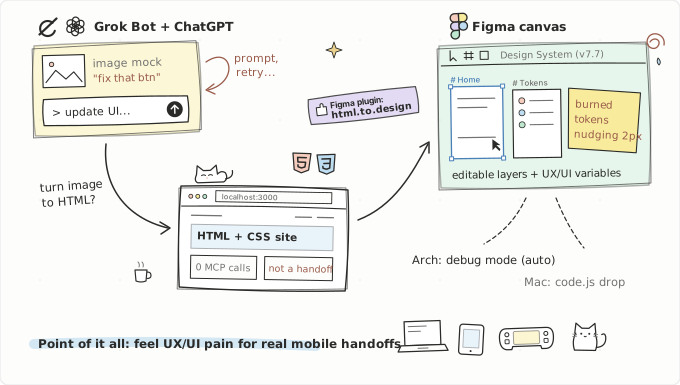
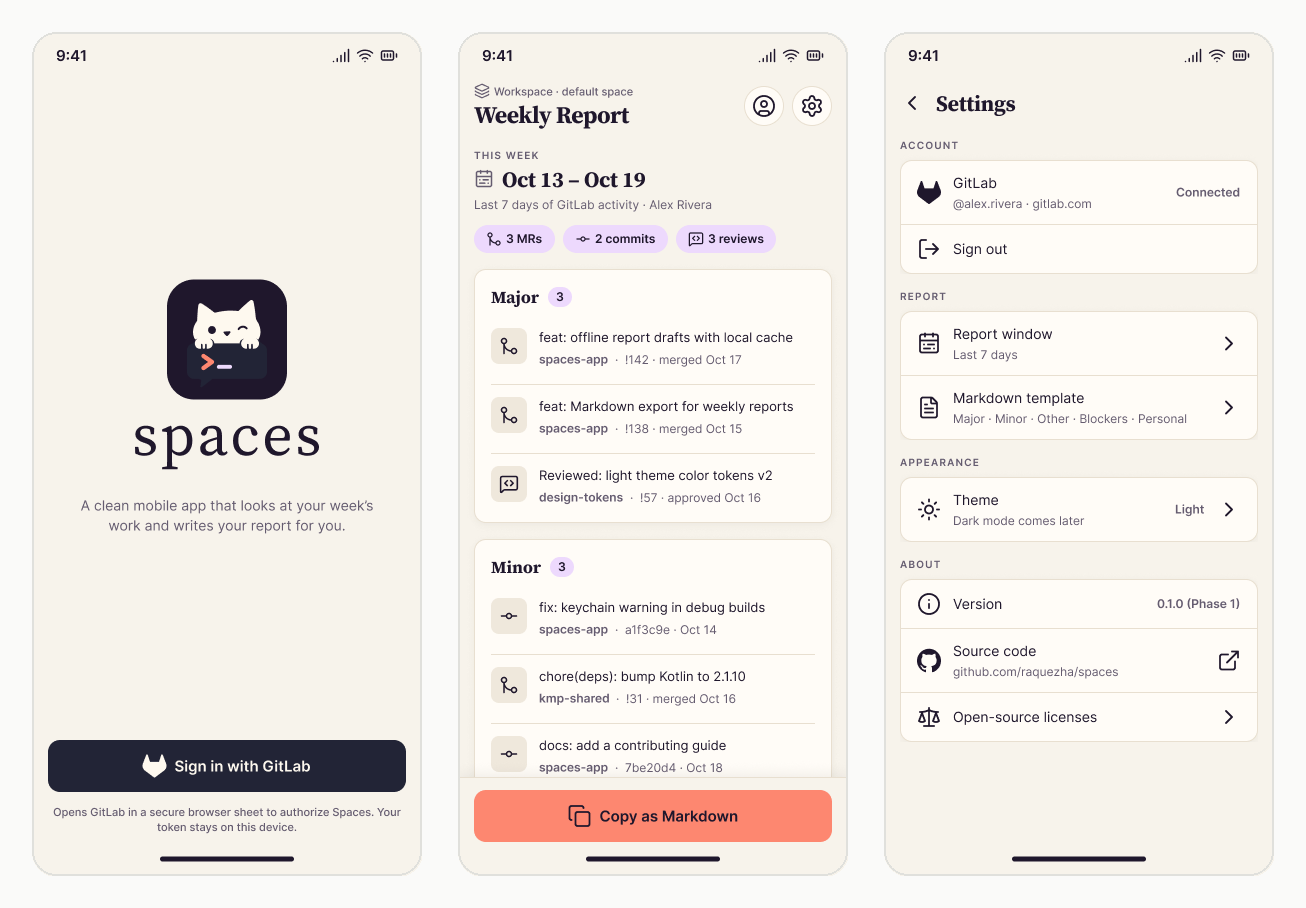
It started while I was playing around with Spaces, my open source Kotlin Multiplatform app. First I prompted Grok Bot for a UI mock and thought, wow, this actually looks good. Then I brought that image into ChatGPT3 to polish it: update this button, fix that card, tweak the layout.
That’s where I learned both bots have weird flaws:
- ChatGPT wins on polish, loses on edits. Ask it to nudge a button 2px and instead of changing just that part, it
moves the buttonregenerates the entire image and drifts away from what you liked. It’s expensive, and it plays it way too safe when you ask it to creatively reimagine a UI. - Grok Bot is rougher, but follows orders. Lower raw quality, way better at creative ideas, and when I said “move this 2px” or “swap that color,” it actually changed only that piece without messing up the rest.
Once the mock felt close enough, I asked if it could turn the image into HTML. It did, and it looked decent in Zen Browser (and worked well in other browsers too).
I could have stopped at HTML, except vibe coded HTML isn’t a real handoff. My actual goal at work is helping our mobile and UX/UI teams standardize Figma handoffs. So when I discovered
html.to.design4 could turn rendered HTML into editable Figma layers, I pulled the whole thing into Figma.
Hitting real Figma pain
Going from image to HTML to Figma got screens onto the canvas, except I’m not a UI designer (wait, with AI am I a UI designer now? haha) I still barely knew how to use Figma. Digging around those imported layers is where I discovered components and variables: you can connect components, link variables across screens, and standardize colors with proper structure. That’s when it clicked for me: good Figma can be structured just like good code.
Then I talked to Ralph from our UX/UI team, and he showed me the Design System they’re building. It felt funny haha, like I was discovering a problem from scratch that they were already fixing and miles ahead on. That’s their main work every day, while for me it isn’t. He gave me access to their R&D file so I could test with real components and variables instead of raw layers.
That’s when the real friction hit. Simple layout tweaks take two seconds in Figma and cost zero AI tokens. Because I’m dumb at Figma, I was burning tokens and MCP calls just to move a button 2 pixels up haha.
Hacking around the limits
Even html.to.design had a free tier wall. For Spaces, I needed 6 main screens and 13 state variants (empty, loading, and error states). Instead of importing them one by one, I stacked 11 states onto one giant HTML page, imported it in a single shot, and split the frames inside Figma. Later I did the same for raquezha.net, drafting pages in HTML, checking them in Zen, and importing them to organize Foundations, Components, and Screens.

 Spaces, I needed 6 main screens and 13 state variants (empty, loading, and error states). Instead of importing them one by one, I stacked 11 states onto one giant HTML page, imported it in a single shot, and split the frames inside Figma. Later I did the same for raquezha.net, drafting pages in HTML, checking them in Zen, and importing them to organize Foundations, Components, and Screens.
To edit inside Figma without burning my 20 monthly MCP calls, I found a second workaround: have the agent generate a local Figma plugin (manifest.json and code.js), drop it into Figma’s Plugins > Development menu, and hit Run. It feels like enabling god mode in Figma. Zero design skills, zero clue what half the buttons do, one click on Run, and suddenly five full mobile screens just spawn on the canvas haha.
Hooray, right? Except I’m a developer, and I didn’t want to manually click buttons every time. I wanted to drive it even further.
Once a development plugin is imported, Figma reads code.js fresh from disk on every run. At home on Arch Linux,5 figma-linux lets you open a local debug port,2 so I wired the agent to update code.js and trigger Figma’s Run last plugin shortcut by itself. You just prompt a change, the agent edits the same plugin and reruns it, and the updated UI automatically appears in Figma with zero clicks.
 Arch Linux,
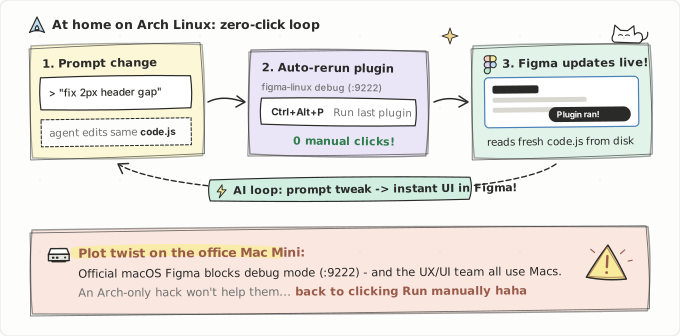
That could have been the perfect ending for the hack, except the real ending happened at the office. My office Mac Mini runs the official macOS Figma app, where debug mode is completely blocked. And since my colleagues on the UX/UI team all use Macs too, an Arch Linux hack doesn’t help them at all. So yeah, full automation fuck that hack haha, back to clicking Run on the Mac Mini. Fun times anyway.
 Mac Mini runs the official macOS Figma app, where debug mode is completely blocked. And since my colleagues on the UX/UI team all use Macs too, an Arch Linux hack doesn’t help them at all. So yeah,
What it gave me
Getting screens into Figma was never the end goal by itself. The whole point of this R&D was to learn how Figma handoffs actually work, document everything I found, and bring real dev feedback back to our UX/UI team:
- Frames on a canvas don’t tell a developer or an agent which color is a background, which one is an accent, or what changes together.
- I discovered DTCG6 (no, not the
Digimon Trading Card Gamehaha, the W3C Design Tokens Community Group). I didn’t even know a whole community for this existed before starting this R&D. Mapping our layers to shared variable names (surface/*,content/*,layout/spacing/*) in their JSON format keeps the exact same names across Figma, CSS, Kotlin, and Swift.
After documenting all of this, I actually understand the UX/UI team’s side too, so I can help standardize our Figma to mobile handoffs instead of guessing from the sidelines.
To be fair, AI is insanely helpful when reading a bunch of components and updating them in real time. Figma MCP is god tier, and so is the price haha. Since this is R&D, I stuck to the free tier and pushed those hacks to the limit first to prove whether the whole venture is actually worth it.
On the design side, both Spaces and raquezha.net made it cleanly into Figma. The next headache was turning those Figma files back into production code. I wrote about the six times things broke on raquezha.net in Design to code drift (coming next). Spaces is up next too.
Footnotes
-
Our company has a paid Figma plan (200+ calls a day), so my colleagues never hit this. My personal R&D files sit on my free Starter account, where 20 calls a month vanish fast, so I had to hack around it haha. See Figma’s MCP rate limits. ↩
-
Figma has no official Linux desktop app, so the community figma-linux project is a beast. Because it lets you open remote debugging, my AI agent could control Figma autonomously at home instead of getting locked out like on macOS. ↩ ↩2
-
Models used across the loop: Grok Bot for initial mocks and targeted tweaks, ChatGPT (mostly gpt-5.6-terra and gpt-6.1-sol) for polish, and Gemini 3.8 Flash for fast HTML and code passes. ↩
-
html.to.design converts rendered browser pages into editable Figma frames. When the initial free imports ran out, registering a free divRIOTS account and logging in and out gave me 10 more imports a month to re-import the states cleanly haha. ↩
-
Turned my old 2018 Asus ROG GLX703GE into a home server running EndeavourOS. Wanna know how I set that up? Writing that post next. ↩
-
Google “DTCG” and the first thing that pops up is the Digimon Trading Card Game haha. The one I discovered here is the W3C Design Tokens Community Group (designtokens.org and their 2025.10 Format Spec), a community of designers and engineers defining a portable JSON standard ($value, $type, and primitive to semantic aliases) so one token file works across Figma, web (CSS), Android (Compose), and iOS (SwiftUI). ↩