Self hosting Outline
I’m an anti-Notion kinda guy. It just doesn’t stick with me, so I find ways to validate my claims haha. Most of my colleagues use it, and I still don’t like it. I don’t think it’s bad. Honestly, it’s top tier. It’s just not my cup of tea.
Here are three things that pushed me to set up our own wiki:
- Ownership hell when someone leaves. A colleague owns the Notion workspace, then leaves the company. Now what? Migration hell. That one is non-negotiable for me.
- Free isn’t really
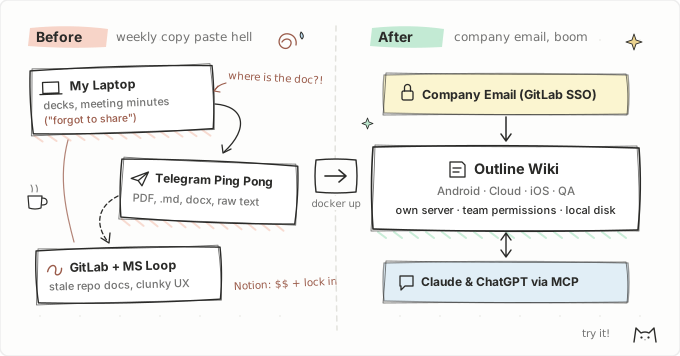
free. Limited users, limited blocks, limited everything until you pay per seat. - Local files and Telegram ping pong. Before we had a central place, I presided over our weekly meetings and kept the docs, decks, and minutes on my laptop. Sometimes I forgot to share them. When I was absent, I passed the role to a teammate, and they sent the notes back through Telegram as a PDF, Markdown file, doc, or plain text. Then I had to open the file, copy everything, and paste it back into my notes. Doing that every week gets tiring fast.
What I want is zero friction setup. Just log in with your company email, boom, that’s it. And one shared place where anyone can drop meeting notes without chasing files in chat.
Friction
Our docs were scattered everywhere: meeting notes in Microsoft Loop, SOP drafts in local Markdown files, and guides buried in different repos. We tried keeping docs in GitLab at first, but they went stale fast. Writing documentation isn’t really our thing. We’re developers. Storage wasn’t the issue. If writing and sharing a guide is annoying, people stop doing it.
For three years we settled for Microsoft Loop because it solved the access problem. Log in with your company email and drop things there. Not trying to call out Microsoft, I just never clicked with Loop’s UX. It felt clunky and never really smooth.1 It solved access, but it still didn’t fit.
I didn’t want to wait a year wait for a company wide tool. Since I already had access to a Linux server we used, I spun up Outline2 as a small R&D experiment, and my colleagues started using it. I even wired up its MCP server3 to our company Claude and ChatGPT accounts.
Why Outline fit
Outline is an open source wiki. It feels as fast as Notion, runs in Docker, logs in through the SSO you already have, and has an API.
For my team that meant:
- A clean Markdown editor with nested collections
- Login through our own GitLab, so company email works out of the box and nobody manages a new password
- Share links for demos with other teams
- An API and MCP connection that already works with our Claude and ChatGPT accounts
- No custom docs site to maintain
And because it lives on our own server, nobody owns the workspace personally. If anyone leaves, the docs stay put.
How I set it up

Everything sits in Docker Compose on one small Linux box: Outline, PostgreSQL, Redis, and Caddy for HTTPS.4
Normally Outline wants S3 or MinIO for file uploads. I skipped that on purpose. This started as an R&D test to prove Outline works, and paying for extra storage or running more containers didn't make sense yet. So I saved uploads straight to the local disk until next sprint "for now". Funny enough, "for now" is still running fine today haha. The only catch is backups: if the server dies, you need the PostgreSQL data folder and the uploads folder. Redis you can ignore.
The rest was boring on purpose:
- Login: GitLab OIDC, because everyone already had a GitLab account with their company email.
- Database: PostgreSQL stays on the internal Docker network with no database port exposed on the host.
- Reverse proxy: Caddy handles TLS automatically and points to Outline on a private local port since the default port was already taken on that box.
If you try this yourself, point your DNS record at the server before booting Caddy, have your GitLab OIDC keys ready before first launch, and decide who owns backups before your team starts trusting it. For official configs and other deployment choices, check Outline’s installation methods docs.
How I organize it
I grouped collections by team: Android, Cloud, iOS, and QA. You can keep a collection private to yourself or your team, and since everyone logs in with their company email, permissions stay simple.
I chose to run one shared Outline instance for everyone instead of spinning up separate ones per team. Having one place makes cross team docs like API contracts, release checklists, and QA test plans easy to reference without switching workspaces. Each team still controls their own space for onboarding guides, SOPs, and internal playbooks.
Most Notion features are already here anyway, so switching didn’t feel like a downgrade. For weekly meetings, notes follow a simple tree:
Weekly Meeting
  └── 2026
        └── 07 July
              └── 2026-07-23
Because I wired up the Outline MCP server, most of us don't even open the browser to update docs. We just ask Claude or ChatGPT to read or update notes directly. The only rule I enforce is keeping human meeting notes apart from automated agent reports, so an AI summary never overwrites what people actually discussed.
We also use Outline as our publishing spot instead of building a custom docs site. Whenever we need to show something in a sprint demo or share a guide with another department, we just generate a share link and drop it in chat. No more exporting PDFs or worrying if someone opened an old attachment.
I’m happy I found Outline. Maintaining it is easy anyway: just docker compose pull, bring it back up, done. The only thing I half worry about is the day uploads fill up the disk or the server gets overloaded. If that happens, I’ll fix it then.
Try Outline. It’s good!
Footnotes
-
Microsoft Loop works well if your team already lives inside Microsoft 365. For developers living in GitLab and Markdown, it always felt like extra clicks. ↩
-
Outline and its source on GitHub. ↩
-
Model Context Protocol (MCP) lets Claude and ChatGPT read and update Outline collections directly without opening the browser. ↩
-
Caddy handles HTTPS certificates automatically with a three line config file. ↩